
FESCO Bill Online Check June 2026| Check Electricity Bill October 2026
Check your FESCO bill online using your 14-digit reference number — fast, free, and available 24/7 for all Faisalabad Electric Supply Company consumers. Enter your reference number in the field below and click Generate. Your complete FESCO electricity bill will appear instantly, showing bill amount, due date, meter reading, and payment status. You can also use your 10-digit customer ID as an alternative. No registration required. You can check mepco bill here.
If you have forgotten your 14 digit reference number and want FESCO bill check without reference number. You can use 10 digit customer ID instead of reference number. Enter your customer ID below to check FESCO online bill.
How to Check Your FESCO Bill Online?
Checking your FESCO bill online takes less than 30 seconds. Follow these simple steps:
Step 1: Find your 14-digit reference number on your physical FESCO bill. It is printed at the top left corner of the bill.
Step 2: Enter the reference number in the input field above.
Step 3: Click the Generate button. Your complete FESCO bill will appear on screen.
Step 4: To download your bill, click the Print button at the top of the displayed bill. In the print dialog, change the Destination to “Save as PDF” and click Save.
If you entered an incorrect number, an alert message will appear asking you to check and re-enter the correct 14-digit number.
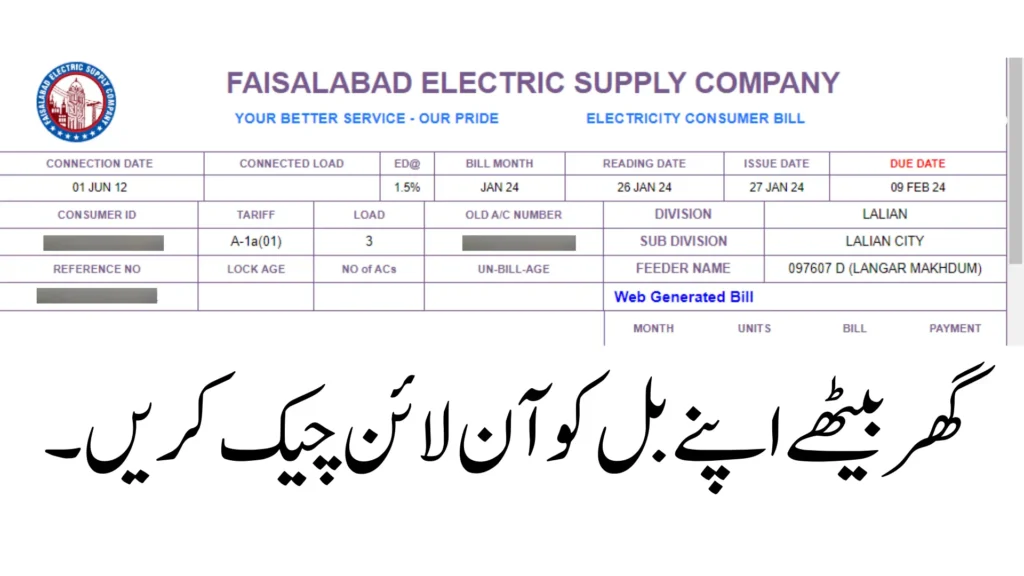
Table of Contents
FESCO Bill Check by Customer ID
Do not have your reference number? You can still check your FESCO bill using your 10-digit customer ID.
Your customer ID is printed just below the reference number on your physical electricity bill. It is a 10-digit number that uniquely identifies your electricity connection.
Simply enter your customer ID in the second input field on this page and click Check Bill. Your complete FESCO electricity bill will appear instantly, showing the same information as the reference number method — bill amount, due date, meter reading, and 12 months of billing history.
This is the most convenient option for anyone who has lost their physical bill but still remembers their customer ID.
Download or Print FESCO Bill Online
Once you have located the fesco bill you want to view, you will see options to download or print the bill.
- To download the bill as a PDF file, look for a “Download” button or link. This will allow you to save the PDF file to your computer for record keeping.
- To print the bill, look for a “Print” button or link. This will open the bill in a print friendly format. Make sure your printer is connected and has paper loaded, then click print. This will allow you to have a physical copy of the bill.
- The PDF file can also be printed at any time after downloading by opening it and using your computer’s print options. Having a printed copy of the bill can be useful for attaching to checks or money orders when paying by mail.
The download and print options allow you to save or print a copy of the bill for your records. This can be important for tracking payments and amounts owed. Be sure to take advantage of these features when reviewing your bills online.
Review FESCO Bill Details
Once you have selected the bill you want to view, carefully review all of the details to ensure everything is accurate. Here are some key things to check:
- Account Number – Verify that the account number on the bill matches yours. This ensures you are looking at the correct bill for your account.
- Billing Period – Check the billing period shown. This should cover the dates for the services you are being billed for. Make sure the dates make sense based on your usage.
- Charges – Review all charges listed. Make sure you understand what each charge is for. Some common Fesco bill charges include:
- Basic monthly service fee
- Additional usage or overage charges
- One-time fees for new services or equipment
- Taxes and regulatory fees
Scan through the full list to ensure all charges look valid for the services you have. Look for any unfamiliar or incorrect charges. Also check that promotional discounts you signed up for are being properly applied.
Taking a few minutes to thoroughly check the details on your Fesco bill can help you spot any issues right away instead of disputing charges later. Make sure you understand what you are being billed for. Reach out to customer service if you find any discrepancies. If you need to check PESCO bill online, You can view from here.
FESCO Bill SMS Alerts
FESCO offers an SMS bill alert service to help customers stay updated on their electricity bills. This free service allows FESCO customers to register their mobile number to receive alerts related to their electricity bills via SMS.
To register for the FESCO SMS bill alerts service, customers can visit the FESCO website and enter their account reference number and mobile number. They can also register directly via SMS by texting their account number to 8118.
Once registered, customers will receive the following SMS alerts from FESCO:
- Reminder when their new bill has been generated
- Notification when the bill is ready to view and download online
- Alerts before the bill due date as a reminder to pay on time
The SMS bill alerts help FESCO customers stay up-to-date on their electricity bill status without having to proactively check. Receiving reminders on bill generation and payment due dates enables customers to avoid late fees and service disruption. The service brings convenience and helps customers manage their electricity account efficiently.
How to Pay FESCO Bill Online
There are several convenient ways to pay your FESCO electricity bill online. You do not need to visit a bank or stand in a queue.
Via JazzCash:
Download the JazzCash app and log in to your account. Tap on Utilities Bill and then select Electricity. Search for FESCO in the search bar and select it. Enter your 14-digit reference number. The app will show your bill amount, consumer name, and due date. Tap Pay to complete the payment instantly.
Via Easypaisa:
Open the Easypaisa app and log in. Go to Bills and then select Electricity. Search for FESCO and select it. Enter your 14-digit reference number. Review the bill details and confirm your payment.
Via NayaPay or SadaPay:
Open the app, go to Bills and Utilities, search for FESCO, enter your reference number, and pay directly from your wallet balance.
Via Internet Banking:
Log in to your bank’s mobile app — HBL, UBL, Meezan, Allied Bank, or any other. Go to Bill Payments, select Electricity, search for FESCO, enter your reference number, and confirm.
Via Internet Banking:
Log in to your bank’s mobile app — HBL, UBL, Meezan, Allied Bank, or any other. Go to Bill Payments, select Electricity, search for FESCO, enter your reference number, and confirm.
Via ATM:
Visit any nearby ATM. Select Bill Payment from the menu. Choose Electricity and then FESCO. Enter your 14-digit reference number and the amount. Confirm the transaction.
Via Bank Branch or Post Office:
Take your physical or printed duplicate bill to any authorized bank branch or Pakistan Post office and pay over the counter with cash or cheque.
Important: If you pay your bill after the due date, a late payment surcharge will be added to your next bill. Always try to pay before the due date shown on your bill.
FESCO Load Shedding Schedule
Load shedding is one of the most common concerns for FESCO consumers. Knowing your area’s power outage schedule helps you plan your daily routine and protect your appliances.
FESCO updates the load shedding timetable every month. The schedule varies by feeder and subdivision, so two houses in the same city may have different schedules.
How to Check Your FESCO Load Shedding Schedule:
Visit the official CCMS portal — the Customer Complaint Management System. Enter your 14-digit FESCO reference number and click Search. The system will show your subdivision details, feeder name, and the complete load shedding schedule for your area.
To reduce the impact of load shedding, try to:
Schedule heavy appliance use like washing machines and dishwashers during non-load-shedding hours. Keep your phone and power banks charged during available power hours. Use a UPS or inverter for essential devices like fans and lights.
For the most up-to-date schedule, check the CCMS portal regularly as timings change every month.
FESCO Service Areas in Punjab
FESCO provides electricity to several major cities and towns across central Punjab. FESCO covers the following areas:
| Cities | Cities |
|---|---|
| Faisalabad | Jhang |
| Khushab | Mianwali |
| Mianwali | Sargodha |
| Bhakkar | Chiniot |
| Toba Tek Singh | Layyah |
| Layyah | Shorkot |
In total, FESCO provides electricity to over 36 cities and towns in Punjab according to FESCO Bills Facebook page. The complete contact details for each regional office can be found on the FESCO website. Customers can reach out to the relevant regional office for any queries or complaints related to new connections, billing, power outages etc. in their locality.
Taxes In FESCO Online Bill
In your Faisalabad Electric Supply Company (FESCO) bill, you may see various taxes and surcharges included. These charges are levied by the government and are collected by FESCO on behalf of the government. Here are some common taxes and surcharges you might find on your FESCO bill:
GST (General Sales Tax): This tax is charged on the supply of goods and services, including electricity. The current GST rate for electricity in Pakistan is 17%.
FPA (Fuel Price Adjustment): FPA is a mechanism used to adjust electricity tariffs based on changes in fuel prices. It is calculated based on the fuel cost incurred in generating electricity.
TV License Fee: This fee is charged to customers who own a television set. It is collected by FESCO and passed on to the Pakistan Electronic Media Regulatory Authority (PEMRA).
Quarterly Tariff Adjustment: This adjustment is made to reflect changes in the cost of electricity generation and distribution. It is calculated based on the variation in the actual fuel cost compared to the assumed fuel cost used to determine the tariff.
Foreign Component (F.C) Surcharge: The F.C surcharge is applied to recover the cost of electricity imported from other countries. It is calculated based on the exchange rate and the cost of imported electricity.
FESCO Helpline
FESCO provides multiple channels for customers to get support with electricity supply issues, billing questions, new connection requests, and other queries or complaints. Customers can contact FESCO support using the following methods:
- Phone: +92 (41) 9220184-9220229
- UAN: 0800-66554
- Fax: +92 (41) 9220233
FESCO is committed to providing reliable and efficient electricity services to the residents of Faisalabad. Our helpline is available to assist you with any issues or concerns you may have regarding your electricity connection.
Checking your Fesco bill online is a quick and easy process that provides many benefits.
The key benefits of checking your bill online include:
- Instant access 24/7 – you can view your bill anytime without having to wait for a paper copy
- Ability to download/print bills for record keeping
- Option to pay bills online through the apps for convenience
- Access to bill history to compare costs over time
If you have any trouble checking your bill online, Fesco provides customer support contacts on their website. You can also visit their FAQ and Help sections for further assistance.
FESCO Bill Installment Plan — Pay in Monthly Installments
If you are unable to pay your full FESCO electricity bill in one payment, FESCO offers an installment facility. Depending on your bill amount, you can split it into 3 to 12 monthly payments.
Installment limits by officer:
Bill up to Rs. 50,000 — 3 monthly installments — Contact SDO or AM(O)
Bill up to Rs. 200,000 — 3 monthly installments — Contact XEN or DM(O)
Bill up to Rs. 500,000 — 4 monthly installments — Contact SE or Manager (O)
Bill up to Rs. 10 Lac — 5 monthly installments — Contact Director Commercial
Bill up to Rs. 20 Million — 12 monthly installments — Contact CSD
How to Apply:
Visit your nearest FESCO subdivision office with your 14-digit reference number. Request an installment plan from the relevant officer based on your bill amount. Once approved, you will pay one portion each month along with your current monthly bill until the full amount is cleared.
What is FESCO — About Faisalabad Electric Supply Company
FESCO stands for Faisalabad Electric Supply Company. It is one of the eight electricity distribution companies operating under WAPDA in Pakistan. FESCO was established to manage the distribution of electricity across central Punjab.
FESCO is responsible for distributing electricity to homes, shops, factories, and businesses in its service area. It handles meter installation, monthly billing, complaint management, new connection applications, and maintenance of the electricity distribution network.
FESCO purchases electricity from national generation companies including WAPDA Hydel and independent power producers, and distributes it through a network of grid stations, feeders, and distribution lines.
FESCO serves millions of consumers across its coverage area and continues to expand its network to reach unserved areas of central Punjab.
FESCO Net Metering — Solar Energy Policy 2026
If you have installed solar panels at your home or business, you can benefit from FESCO’s net metering policy. Net metering allows solar users to send excess electricity back to the national grid and get credit for it on their monthly bill.
How Net Metering Works:
During the day, your solar panels generate electricity. If your panels produce more than you consume, the extra units flow back into the grid. FESCO’s net meter records both what you consumed from the grid and what you sent back. At the end of the month, you only pay for the net difference — what you used minus what you gave back.
Benefits of Net Metering for FESCO Consumers:
Your monthly electricity bill reduces significantly, especially in summer when solar production is at its peak. You recover the cost of your solar installation faster. You contribute to reducing load on the national grid during peak hours.
To apply for net metering with FESCO, visit your nearest FESCO subdivision office and submit an application along with details of your solar system capacity. FESCO will conduct a site inspection and install a bi-directional net meter.
FAQs
What is the 14-digit reference number?
Your consumer number, also known as the reference number, is a crucial piece of information on your FESCO bill. It uniquely identifies your account and is used for various purposes related to your electricity connection. By understanding the importance of your consumer number and knowing where to find it on your bill, you can easily manage your electricity account with FESCO.
How do I check the status of my Fesco bill payment?
If you’ve paid your online bill using JazzCash, Easypaisa, or any banking app, you can verify the successful payment by checking your transaction history or account statement. If you pay your same bill mistakenly twice, you don’t need to be worry at all because it will be automatically adjust and fix in next month bill.
Can I pay my FESCO bill online?
How can I check my FESCO bill without reference number?
If you don’t have your FESCO bill reference number, you can still check your bill using other information such as your Customer ID.
How can I check my FESCO bill by SMS?
To receive your current bill amount via SMS, send a message to 8118 with your electricity meter number.
How do I check my FESCO electricity bill online?
you can check your electricity bill through mepcobillonlinecheck.pk/fesco-bill-online . Just enter your reference number and get your online bill.
How can I download my electricity bill in Pakistan?
Once you have entered your details, you should be able to view and download your electricity bill in PDF format. Save the downloaded bill for your records or print it if you need a hard copy.