
MEPCO Bill Check Online 2026
Check & Download Your MEPCO Bill
Instantly view, download, and print duplicate electricity bills. Enter your reference number and get your bill in seconds.
MEPCO Bill Check Online: Check, Download and Understand Your Electricity Bill
Checking your MEPCO bill online lets you see your latest electricity bill without waiting for the printed copy to arrive. You can check the amount due, payment deadline, electricity consumption, arrears, taxes and other billing details from your phone or computer.
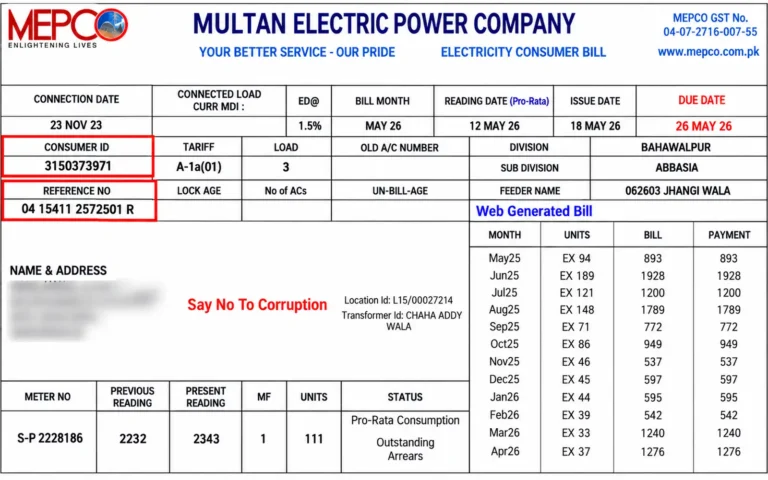
To find your bill, you usually need either your 14-digit MEPCO reference number or your 10-digit Customer ID.
This guide explains how to check a MEPCO electricity bill online, where to find your reference number, how to download a duplicate bill, what the numbers on your bill mean, and what to do when your latest bill is not available.
Quick MEPCO Bill Check
Before checking your bill, keep one of these details ready:
| Information | Typical format | Where to find it |
|---|---|---|
| Reference Number | 14 digits | Near the top of your MEPCO bill |
| Customer ID | 10 digits | Printed separately on the bill |
| Billing information | Varies | On your current or previous bill |
Enter the required number into the bill-checking form, submit it, and review the latest available billing record.
For the most accurate result, copy the number directly from a previous bill instead of typing it from memory.
How to Check Your MEPCO Bill Online
Checking your electricity bill online only takes a few steps.
Step 1: Find Your Reference Number or Customer ID
Take a previous MEPCO bill and look near the upper section of the document.
Your reference number is generally a 14-digit number. Your Customer ID is a separate 10-digit identifier.
If the bill-checking form accepts both, you can use whichever number you have available.
Step 2: Enter the Number
Enter your reference number or Customer ID into the appropriate field.
Check every digit before submitting the form. Do not add spaces or punctuation unless the form specifically requires them.
Step 3: Open Your Latest Bill
After submitting the correct information, the available bill should appear on the screen.
The bill can include:
- Current amount payable
- Due date
- Electricity units consumed
- Previous balance
- Arrears
- Taxes and duties
- Billing period
- Meter information
- Previous consumption
- Late payment amount, where applicable
Step 4: Download or Print the Bill
If you need a physical copy, use the print option provided by the bill page.
You can also save the bill as a PDF on your phone or computer for future reference.
MEPCO Bill Check in 3 Simple Steps
The entire process can be remembered as:
01 Find your number → 02 Check your bill → 03 Save or print
01. Find Your Number
Locate the 14-digit reference number or 10-digit Customer ID on an earlier bill.
02. Check Your Bill
Enter the information into the online bill-checking form and submit it.
03. Download or Print
Once your bill appears, save a PDF copy or print it if you need a paper version.
This simple process is useful when your printed bill has been lost, delayed or damaged.
Where Can You Find Your MEPCO Reference Number?
Your MEPCO reference number is printed on your electricity bill, usually in the upper portion of the document.
It is normally made up of 14 digits and may be followed by a letter such as U or R.
If your bill contains both a reference number and Customer ID, do not confuse the two.
Reference Number vs Customer ID
| Feature | MEPCO Reference Number | Customer ID |
|---|---|---|
| Typical length | 14 digits | 10 digits |
| Printed on bill | Yes | Yes |
| Purpose | Identifies the billing connection | Identifies the customer |
| Used for online checking | Commonly accepted | Accepted by supported services |
| Where to find it | Previous electricity bill | Previous electricity bill |
If you have an old MEPCO bill, keep a digital photograph or PDF of it. This can make future online bill checks much easier.
Understanding the MEPCO Reference Number
The reference number is not simply a random sequence of digits. It contains sections used within the electricity billing system.
A reference number can be represented in this format:
15 | 15125 | 1234567
| Section | Number of digits | Example | General meaning |
|---|---|---|---|
| Batch | 2 | 15 | Billing batch |
| Subdivision | 5 | 15125 | Local subdivision identifier |
| Consumer serial | 7 | 1234567 | Individual connection identifier |
The letters sometimes displayed after the number, such as U or R, can indicate the applicable service classification.
Because billing systems can change, it is best to copy the complete identifier directly from your bill instead of attempting to construct it yourself.
What Is MEPCO?
MEPCO stands for Multan Electric Power Company.
It is an electricity distribution company serving consumers across a large part of southern Punjab, Pakistan.
MEPCO was established in 1998 during the restructuring of electricity distribution operations in Pakistan. Its service area includes residential, commercial, agricultural and industrial consumers.
Areas associated with the MEPCO service region include:
- Multan
- Bahawalpur
- Dera Ghazi Khan
- Rahim Yar Khan
- Sahiwal
- Vehari
- Muzaffargarh
- Khanewal
Your electricity bill is not determined only by the number of units consumed. The final amount can also depend on your tariff category, applicable taxes, duties, adjustments and any outstanding balance.
This is why two consumers with similar electricity usage may receive different bill amounts.
What Information Is Shown on a MEPCO Bill?
A MEPCO electricity bill contains several pieces of information that help you understand how the final amount was calculated.
| Bill detail | What it tells you |
|---|---|
| Reference number | Identifies the electricity connection |
| Customer ID | Identifies the customer record |
| Meter number | Identifies the installed meter |
| Billing period | Shows the period covered by the bill |
| Current reading | Records the latest meter reading |
| Previous reading | Shows the earlier meter reading |
| Units consumed | Indicates electricity usage |
| Due date | Payment deadline |
| Current amount | Amount payable under normal payment terms |
| Arrears | Previous unpaid amount, if any |
| Taxes and duties | Government and electricity-related charges |
| Late payment amount | Amount applicable after the due date |
Checking these details can help you understand why your current bill is higher or lower than the previous one.
How to Download a Duplicate MEPCO Bill
If your paper bill has been misplaced, you may be able to obtain an electronic copy through the online billing service.
After entering your reference number or Customer ID:
- Open the available bill.
- Check your consumer details.
- Review the amount and due date.
- Select the print option.
- Choose the PDF or save option available on your device.
- Store the file somewhere you can find it later.
A saved PDF can be useful when you need the bill for payment, record keeping or resolving a billing issue.
Why Is My MEPCO Bill Not Showing?
A bill may fail to appear for several reasons. Before contacting customer support, check the following possibilities.
| Problem | Possible reason | What you can do |
|---|---|---|
| Bill not found | Incorrect reference number | Compare the digits with an older bill |
| Blank result | Temporary system issue | Refresh and try again later |
| Previous bill appears | New bill is not available yet | Check again after the billing period |
| Record unavailable | Connection information changed | Contact the relevant MEPCO office |
| Page loads slowly | Heavy website traffic | Try again later |
| You have no bill number | Identifier is unavailable | Look for an older bill or contact MEPCO |
Check Your Digits Carefully
The most common mistake is entering one incorrect digit.
A 14-digit reference number should be checked digit by digit. If you are using a Customer ID, make sure all 10 digits have been entered correctly.
Try Again Later
Online billing systems can experience delays or heavy traffic, especially around payment deadlines.
If your information is correct but the page does not respond, wait and try again.
Check Your Previous Bill
If you have a paper copy from an earlier month, compare the reference number and Customer ID with what you entered.
This can quickly identify typing mistakes.
Why Is My Previous Month’s Bill Showing?
Electricity bills are generated according to billing schedules. The latest bill may not appear immediately if the new billing record has not yet been generated or uploaded.
This means seeing the previous month’s bill does not automatically indicate a problem with your connection.
Try checking again after the expected billing period.
Understanding the MEPCO Due Date
Every electricity bill has a payment deadline.
Your bill may show an amount payable by the due date and a different amount that applies after the deadline.
The later amount can be higher because of a late payment surcharge.
Why Does My Neighbour Have a Different Due Date?
MEPCO bills are issued according to billing schedules and batches.
As a result, two consumers living in the same area can have different billing dates and payment deadlines.
Do not rely on another person’s due date. Always check the date printed on your own bill.
What Happens If You Pay Your Bill Late?
A payment made after the stated due date may result in an additional late payment charge.
Before making a payment, check the amount currently shown as payable.
After completing the transaction, keep your receipt, confirmation message or screenshot until the payment has been properly reflected in your billing record.
This documentation can be useful if the payment later appears as outstanding.
How Can You Pay a MEPCO Bill?
Depending on the payment facilities available in your area, electricity bills can be paid through several channels.
Common options can include:
- Bank branches
- ATMs
- Mobile banking applications
- Digital wallets
- Online payment services
- Other authorized payment channels
Before confirming a payment, verify the reference number, consumer details and amount.
Can You Check a MEPCO Bill on a Mobile Phone?
Yes. You can use a smartphone or tablet to access an online MEPCO bill-checking service.
The process is the same as checking from a computer:
- Open the bill-checking page.
- Enter the reference number or Customer ID.
- Submit the information.
- Review the bill.
- Save or print it if required.
For convenience, you can save the bill-checking page in your browser bookmarks.
Why Is My MEPCO Bill Higher Than Last Month?
A higher bill does not necessarily mean that one particular charge has increased.
The total amount can be affected by several factors.
These factors can include:
- Higher electricity consumption
- Changes in applicable tariffs
- Taxes and duties
- Government adjustments
- Previous unpaid amounts
- Late payment charges
- Other charges shown on the bill
The first thing to compare is your current number of units with your previous consumption.
How to Check Your Electricity Consumption
Your bill may contain current and previous meter readings as well as the number of units billed.
A useful way to review your bill is to compare:
| Check | What to look for |
|---|---|
| Current reading | Is the reading reasonable? |
| Previous reading | Does it match the previous bill? |
| Units consumed | Are they higher than normal? |
| Billing period | Is the period longer than usual? |
| Previous usage | How does consumption compare with earlier months? |
| Additional charges | Are there taxes or adjustments you did not expect? |
If the meter reading or billed consumption appears incorrect, contact MEPCO through the appropriate customer service channel.
Start by comparing the current bill with previous bills.
What If Your Electricity Consumption Suddenly Increases?
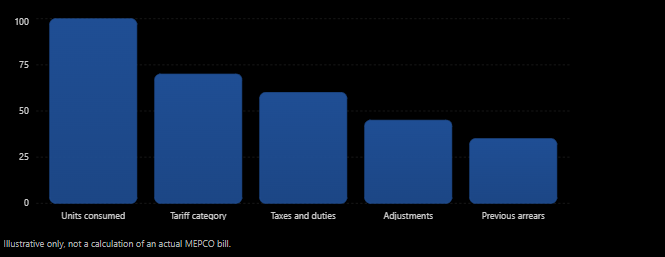
A sudden increase can have several explanations, including increased appliance use, seasonal changes, a longer billing period, tariff changes or additional charges.
For example, greater use of air conditioners, heaters, pumps or other high-consumption appliances can increase the number of units recorded during a billing period.
If the billed meter reading does not appear consistent with your actual meter, request a review through the appropriate MEPCO process.
What Information Do You Need to Check a MEPCO Bill?
For a standard online bill search, you generally need either:
14-digit reference number
or
10-digit Customer ID
Keeping a previous bill in a safe place makes it easier to retrieve these details whenever you need them.
If you have lost every previous bill and do not know either identifier, you may need to contact the relevant MEPCO office and provide the information requested to locate the connection.
Can You Check a MEPCO Bill Without a Paper Bill?
Yes, if you already know your reference number or Customer ID.
The paper bill itself is not necessarily required to perform an online search when you already have the required identifier.
If you do not know your number, however, you may need an older bill or assistance from the relevant electricity office.
MEPCO Bill Services and Helpful Guides
Different electricity-related problems require different solutions. The following topics can help you find the information you need.
MEPCO Bill Calculator
A bill calculator can provide an estimate based on electricity consumption. The final amount on your actual bill may differ because of tariffs, taxes, duties and other applicable charges.
MEPCO New Connection
Consumers applying for electricity service at a new property may need to provide specific documents and follow the applicable connection procedure.
MEPCO Helpline
Billing problems, outages, meter faults and other service issues should be reported through the appropriate MEPCO customer service channel.
MEPCO Bill Payment
There are several ways to pay an electricity bill, including banking channels, ATMs and supported digital payment services.
MEPCO Bill Correction
If your bill contains an unusually high reading, incorrect information or a charge you believe is inaccurate, request a review through MEPCO.
MEPCO Bill Taxes
Your electricity bill may contain different taxes, duties, adjustments and other charges. Understanding each line can help you identify what contributes to the final amount.
MEPCO Peak Hours
Consumers whose tariffs are affected by peak-period rates can review their tariff information and consider shifting flexible electricity usage to other times where practical.
MEPCO Meter Replacement
A defective, damaged or burnt meter may require inspection and replacement according to the applicable MEPCO procedure.
MEPCO Bill Installments
If you cannot pay the entire amount at once, contact the appropriate MEPCO office to ask whether an installment facility is available for your circumstances.
MEPCO Name Change
After purchasing or transferring a property, the electricity connection may need to be updated according to the applicable name-change procedure.
MEPCO Bill Check: Quick Reference Table
| You want to… | What you need |
|---|---|
| Check your latest bill | Reference number or Customer ID |
| Find the amount due | Latest bill |
| Check the payment deadline | Current bill |
| Download a duplicate | Reference number or Customer ID |
| Compare consumption | Current and previous bills |
| Investigate a high bill | Meter readings and consumption history |
| Report a billing problem | Bill and relevant consumer information |
| Ask about a connection | Connection details and required documents |
Frequently Asked Questions About MEPCO Bill Check Online
1. How do I check my MEPCO bill online?
You can check your MEPCO electricity bill by entering your 14-digit reference number or supported 10-digit Customer ID into the online bill-checking form. After submitting the information, the latest available billing record can be displayed.
2. Is MEPCO bill checking online free?
Viewing a bill through an online bill-checking service may not require a separate viewing fee. However, payment providers can have their own terms or charges. Check the payment service before completing a transaction.
3. Can I download my MEPCO bill as a PDF?
Yes, when the online bill page provides a print option, you can generally use your browser’s print function and select the PDF or save option. This creates a digital copy that can be stored on your phone or computer.
4. What if I do not have my MEPCO reference number?
Look for an older paper bill, saved PDF, photograph or digital copy. The reference number is normally printed on the bill.
You can also check whether your Customer ID is available because some bill-checking services accept it instead.
If neither identifier is available, contact the relevant MEPCO office and ask how you can retrieve your connection information.
5. Does the MEPCO reference number change every month?
The reference number is associated with the electricity connection and is not normally replaced with a completely new number for each monthly bill.
Your bill amount, meter readings and other billing details can change from month to month.
Always copy the identifier from your latest available bill when checking your account.
6. Do I need my CNIC to check my MEPCO bill?
A normal online bill search generally uses the reference number or Customer ID.
CNIC information may be requested for certain connection, ownership or customer-service matters, but it is different from the information normally used for a basic bill search.
7. Can I view old MEPCO bills online?
The availability of historical bills depends on the billing system and the service you are using.
The standard bill search is generally intended to provide the latest available bill. If you need a much older bill, contact the appropriate MEPCO office or check your own saved records.
8. What is the difference between the MEPCO reference number and Customer ID?
They are two different identifiers associated with the electricity account.
The reference number is commonly a 14-digit number, while the Customer ID is commonly a 10-digit number. Where the bill-checking service supports both, you can use the identifier requested by the form.
9. Why is my MEPCO bill not showing after I enter the number?
First, check that every digit has been entered correctly.
If the number is correct, the latest bill may not have been generated yet, or the online billing system may temporarily be unavailable.
Try again later. If the problem continues, contact the appropriate MEPCO customer service channel.
10. Can I check my MEPCO bill from a mobile phone?
Yes. A smartphone browser can be used to access the online bill-checking service. Enter your reference number or Customer ID, submit the form and view the available bill.
You can also save a digital copy for future use.
11. Why is my MEPCO bill higher than last month?
A higher bill can result from increased electricity usage, changes in tariffs, taxes, adjustments, arrears, late payment charges or other billing items.
Compare the current units, meter readings and additional charges with your previous bill to identify what changed.
12. Can I check my MEPCO bill without the paper copy?
Yes, as long as you know your reference number or Customer ID.
The physical bill is mainly useful because it contains the identifiers needed to retrieve the billing record.
13. What should I do after paying my MEPCO bill?
Keep your payment receipt, transaction number, confirmation message or screenshot until the payment is reflected in your billing record.
If the payment later appears as unpaid, your transaction record can help when contacting the payment provider or MEPCO.
14. Can I print a duplicate MEPCO bill?
If the online billing page provides a printable version, you can print another copy.
You can also save the displayed bill as a PDF and print it whenever necessary.
15. What should I do if I cannot read my reference number?
Compare the unclear number with another copy of the same bill if one is available.
Avoid guessing missing digits. An incorrect number can result in a failed search or an incorrect billing record.
16. Why is my neighbour’s MEPCO due date different from mine?
Electricity bills are issued according to billing schedules and batches.
Because consumers can belong to different billing batches, their bills and payment deadlines may not be identical even when they live close to one another.
Always follow the due date printed on your own bill.
17. What does U or R mean after a MEPCO reference number?
A letter such as U or R may appear alongside the reference number to indicate a service classification used by the billing system.
If an online form asks for the complete reference information, follow the format displayed on your bill.
18. Can I check my MEPCO bill without knowing the meter number?
For a standard online bill search, the reference number or Customer ID is generally the important information.
The meter number is another identifier printed on the bill, but it is not necessarily the number required by the online bill-checking form.
19. How can I tell whether my MEPCO bill has arrears?
Look for the section showing previous balance, arrears or outstanding amounts.
If an amount from an earlier billing period remains unpaid, it may be carried forward and included in the amount shown on the current bill.
20. What should I do if my MEPCO bill contains an incorrect reading?
Compare the current meter reading shown on the bill with the reading displayed on your physical electricity meter.
If the information appears incorrect, keep a copy of the bill and any relevant meter evidence, then contact MEPCO through the appropriate complaint or billing-review process.
Final Thoughts
An online MEPCO bill check is useful when you need to confirm your electricity charges, check a payment deadline or obtain a duplicate copy without waiting for a paper bill.
The two pieces of information worth keeping safely are your 14-digit reference number and 10-digit Customer ID.
When checking your bill, pay attention to more than the final amount. Compare the electricity units, meter readings, billing period, previous balance, taxes and other charges with earlier bills.
If your latest bill does not appear, first verify the number you entered and try again after some time. For billing disputes, meter problems, new connections, ownership changes and other matters that require action from the electricity provider, contact the appropriate MEPCO office.
Regularly reviewing your electricity bill can make it easier to spot unusual consumption or unexpected charges before they become a bigger issue.