
MEPCO Bill Payment – Pay Via Apps
MEPCO bill payment has never been easier. Whether you prefer using a mobile app, internet banking, ATM, or visiting a bank branch — there are over 10 ways to complete your MEPCO bill payment in Pakistan. This guide covers every available payment method with clear step-by-step instructions so you can pay in minutes and avoid late payment charges.
Before you start, make sure you have your 14-digit MEPCO reference number ready. You can find it on your physical bill
or check your bill on this website using your customer ID.
Now it has become very easy to do MEPCO Online Bill Payments.
There was a time when people used to submit MEPCO bills in the Pakistan Post Office. They had to wait for hours in a very long line to pay the MEPCO bill. Still some people do this and waste many hours.
Now you can pay your MEPCO bill in the nearby shop. You just have to visit the shop and give him the bill. They will just charge you a 10 rupees fee for paying your bill. But this will save you a lot of time and hard work.
If you don’t want to visit the shop and want to pay your MEPCO bill online sitting at home, you can use apps like Jazz Cash, EasyPaisa, Naya Pay, SadaPay and other Mobile banking services. They will not cut even 10 rupees fee and will save your whole day from wasting in the long row.
You can also pay your bill after the due date but that will cost you some extra charges.
Here I will describe some of the ways to pay your mepco bill online.
MEPCO Bill Pay Online With Jazz Cash App:
Step 1: Download Jazz Cash App and login to your account. (If you don’t have jazz cash account make a new one)
Step 2: Click on ”Utilities Bill”. It will open a new prompt.

Step 3: Now Click On Electricity.

Step 4: Now search MEPCO and click on it.

Step 5: Here enter your 14 digits reference number click on fetch it will show you information about your bill like bill amount, username and due date. Now you can pay your bill.

You will receive a digital payment receipt in your JazzCash transaction history. Save this as proof of payment.
Pay Bill Online With NayaPay App:
Step 1: Download NayaPay app and login to your account.(Sign up for NayaPay account if you don’t have one).
Step 2: After login you will see an option Bills. Click on that.

Step 3: After this you will be redirected to a new screen and on that click on “Add New”.
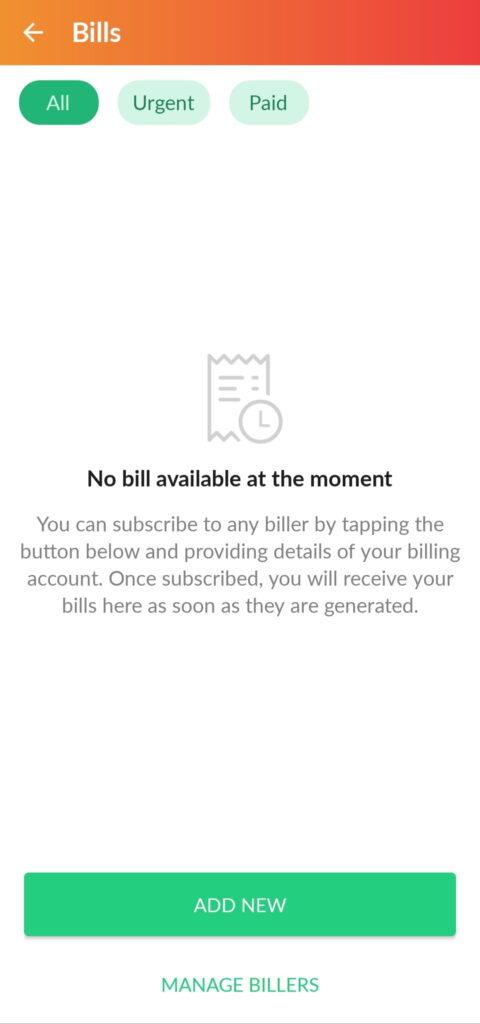
Step 4: Now you will see many options there you will have to search MEPCO and select that option.
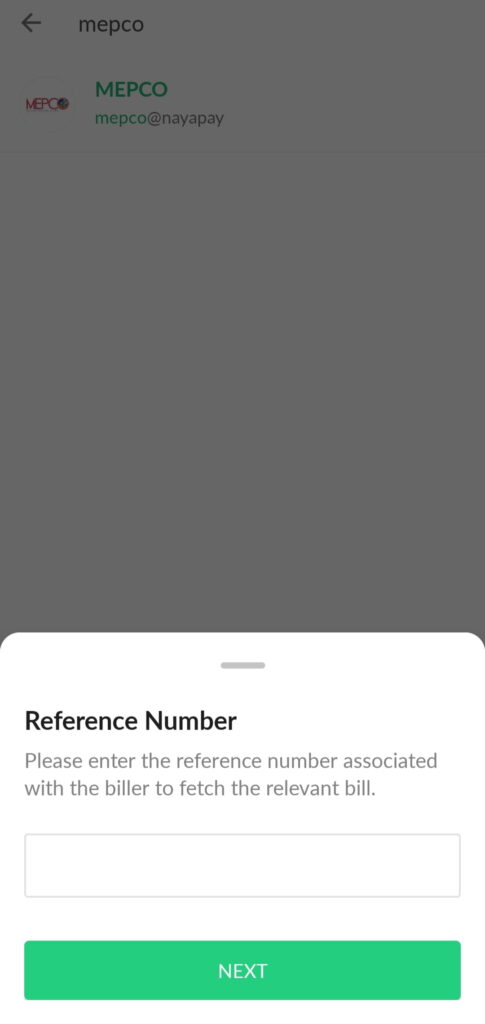
Step 5: Now Enter your 14 digits reference number. This will show specific information about your bill like Consumer name, Bill amount and due date. There click on subscribe and pay your bill.
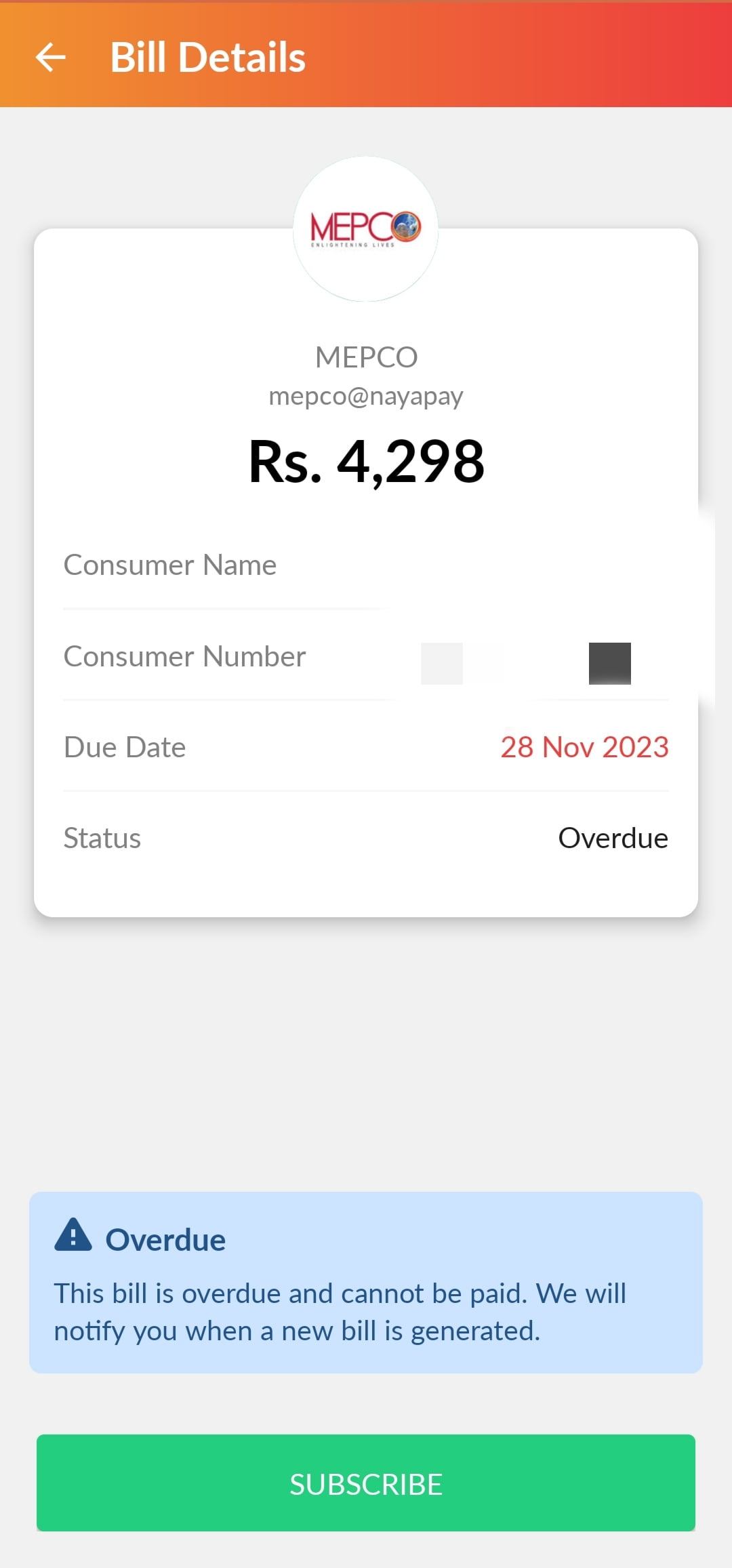
NayaPay also allows you to set up automatic monthly MEPCO bill payment so your bill is paid on time every month without any manual action.
How To Pay MEPCO Bill Online With SadaPay App:
Step 1: Download the SadaPay app and login to your account.(Sign up for a new SadaPay account if you don’t have one).
Step 2: On the home screen click on payments the option on the bottom end.
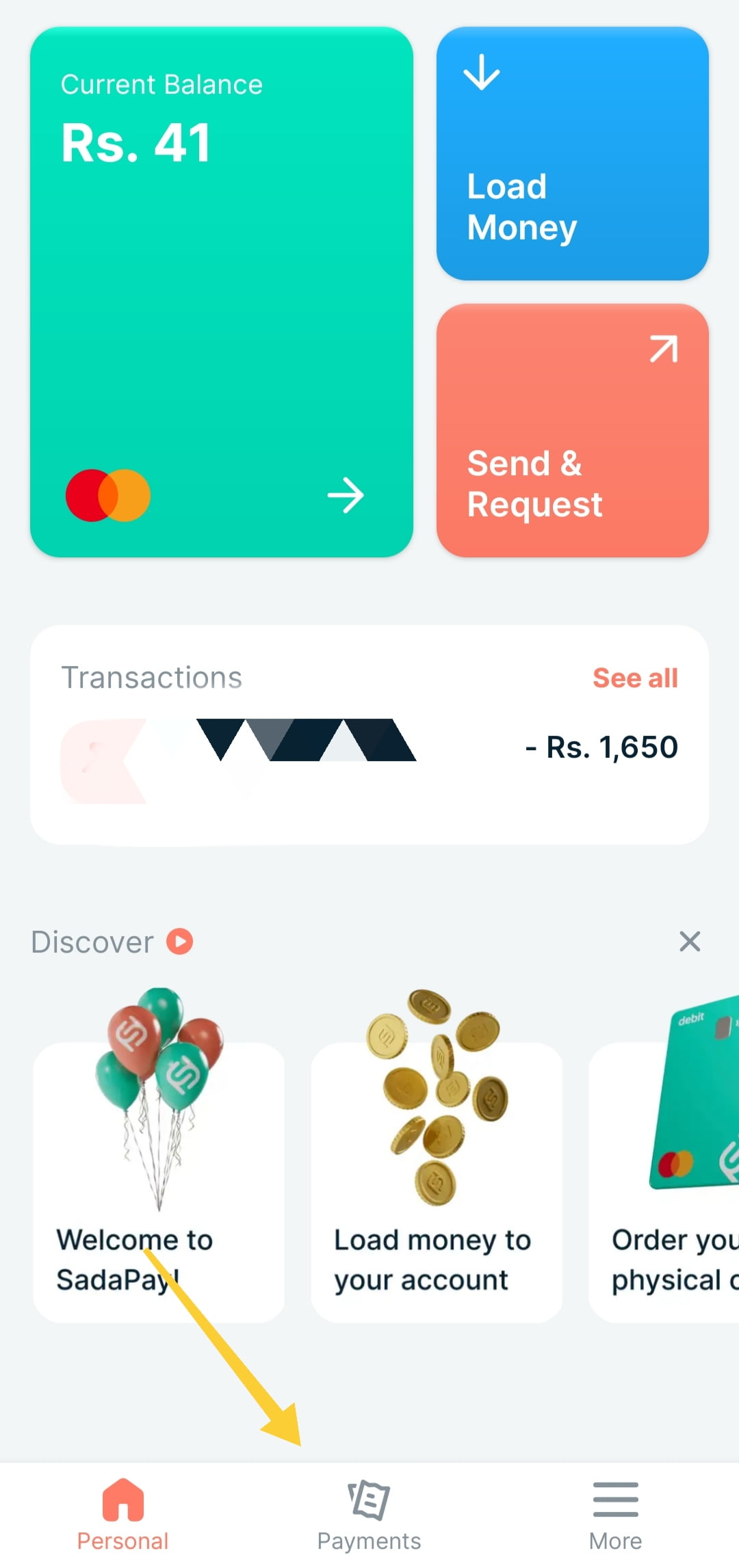
Step 3: It will show 3 options. One of them is “Bills and Utilities”. Click on that option.
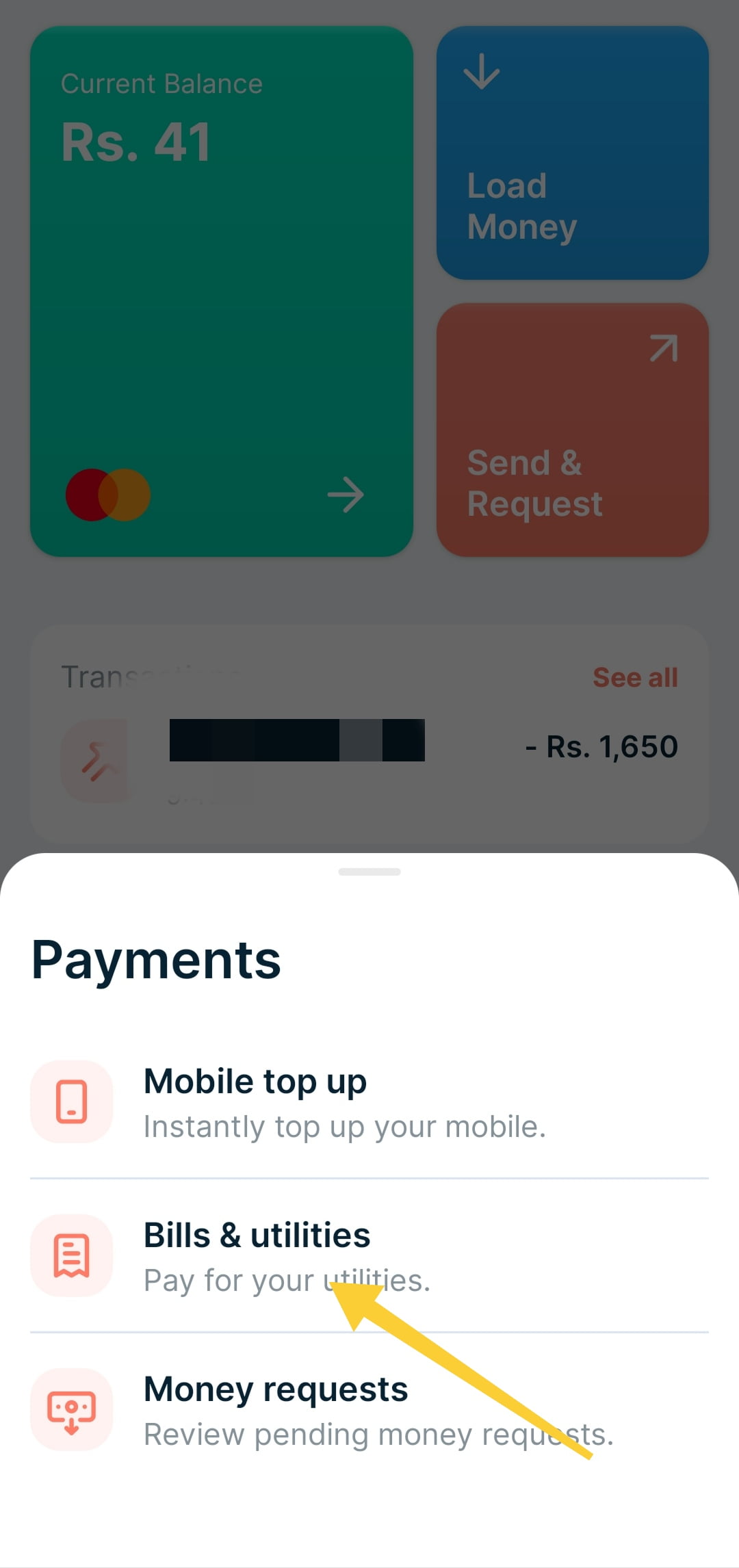
Step 4: Here click on new bill payment and search for MEPCO and click on that this will redirect you to a page where you will have to enter a 14 digits reference number and this will show basic bill information. Click on pay and your bill will be paid successfully if you would have sufficient balance in your account.
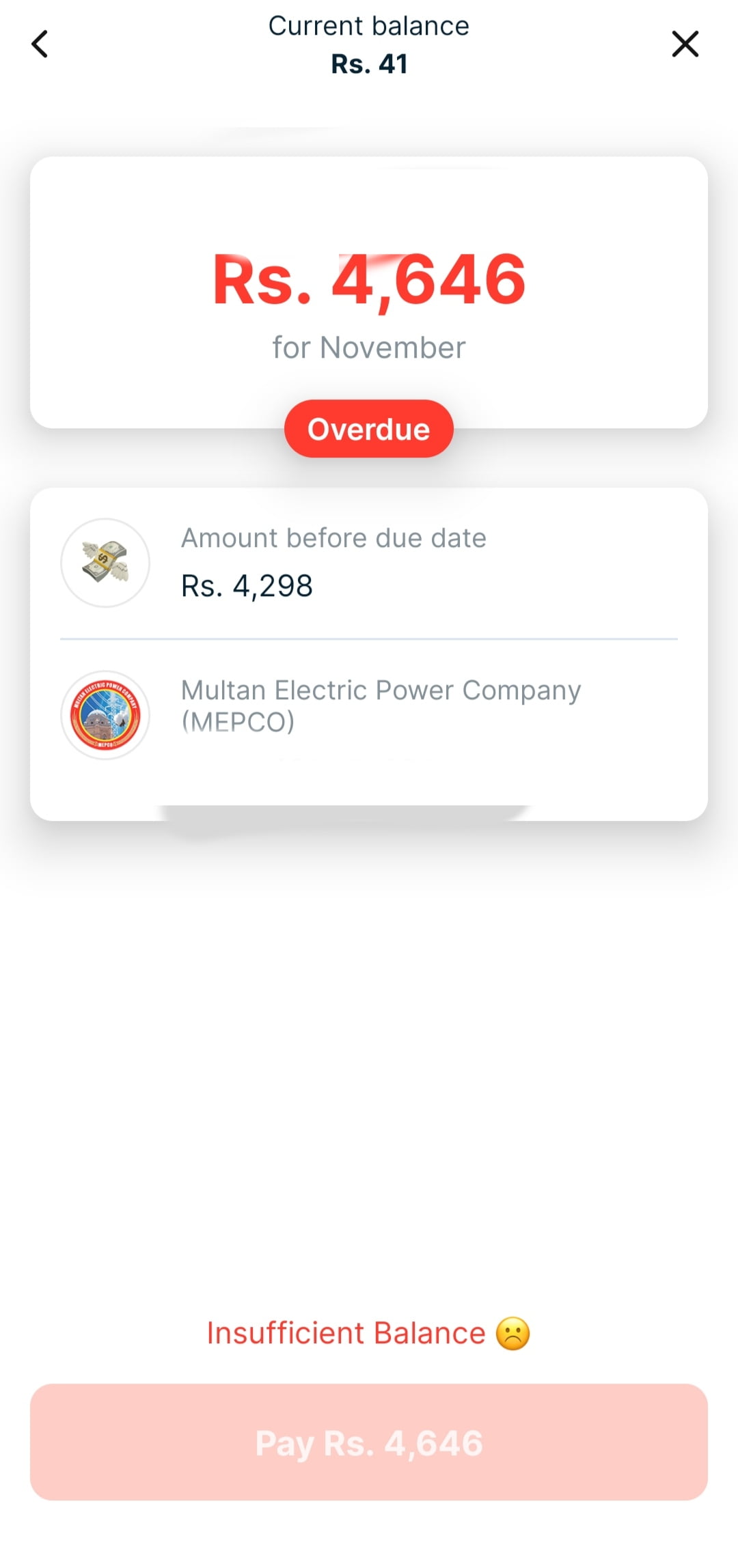
SadaPay charges zero fee for bill payments and the transaction completes in real time.
How to pay MEPCO bill with UBL app?
Step 1: Download the UBL app. Enter username and password to login to your account. You must have an account in UBL bank to use the app otherwise you can’t use UBL app.
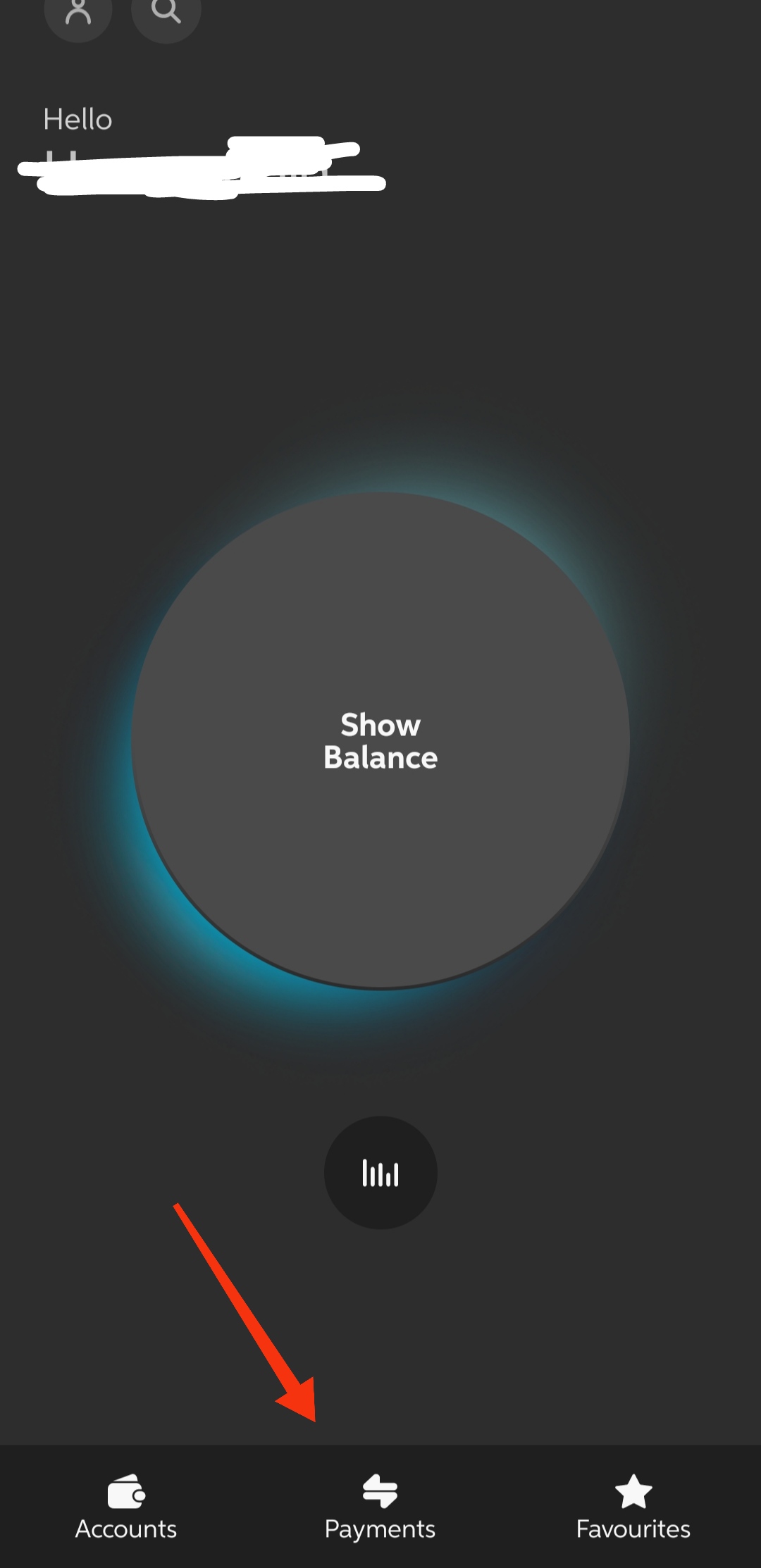
Step 2: On the home screen click on “payments” on the bottom menu. It will pop up some options. There click on Bill Management and then select Utility Bills.
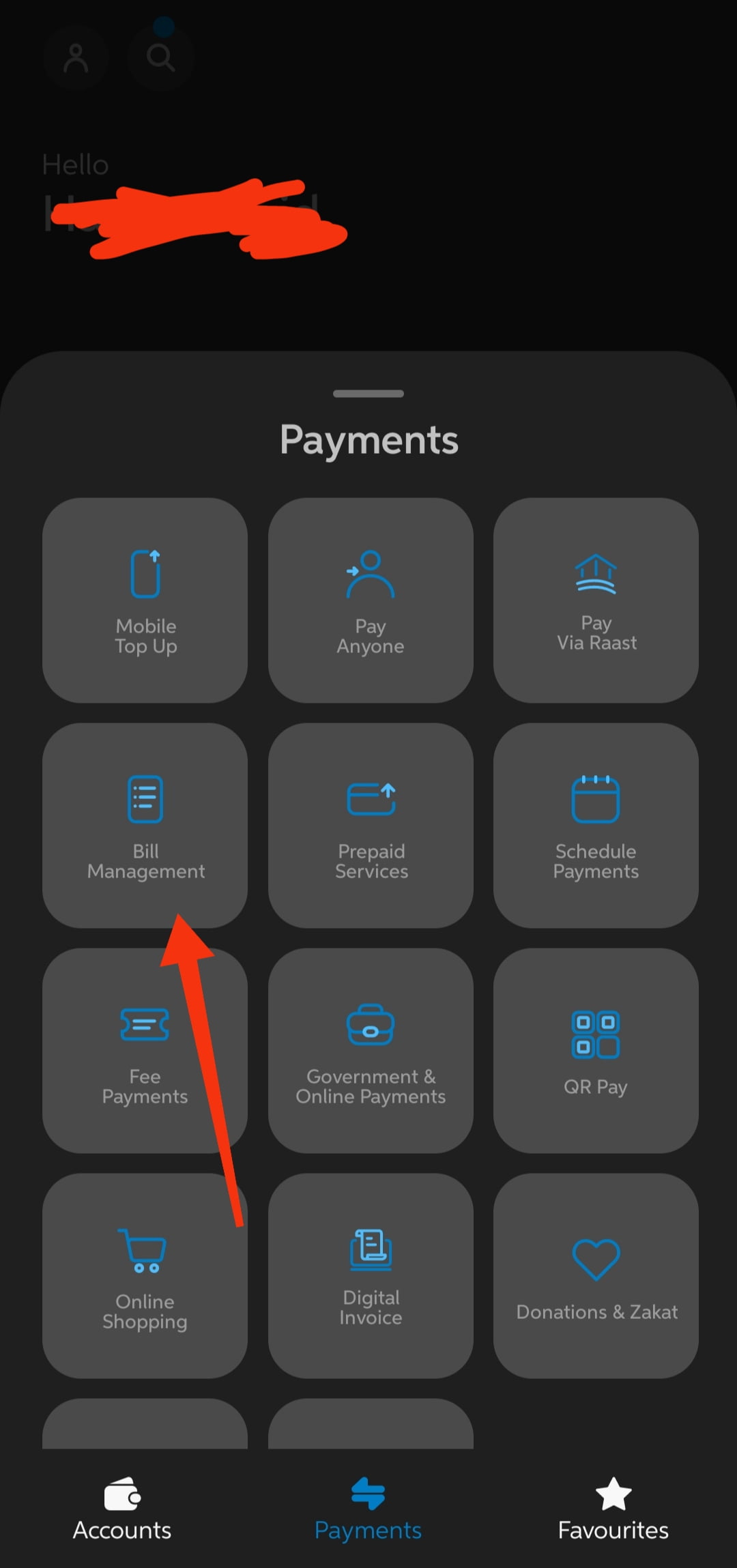
Step 3: Now search MEPCO in the search bar and enter your 14 digits reference number mentioned on your MEPCO bill. Now click on the save button at the bottom. Now OTP confirmation message will come to your number and it will automatically be verified. Now MEPCO has saved in your UBL account with your reference number. Just select that option and pay your bill with one click.
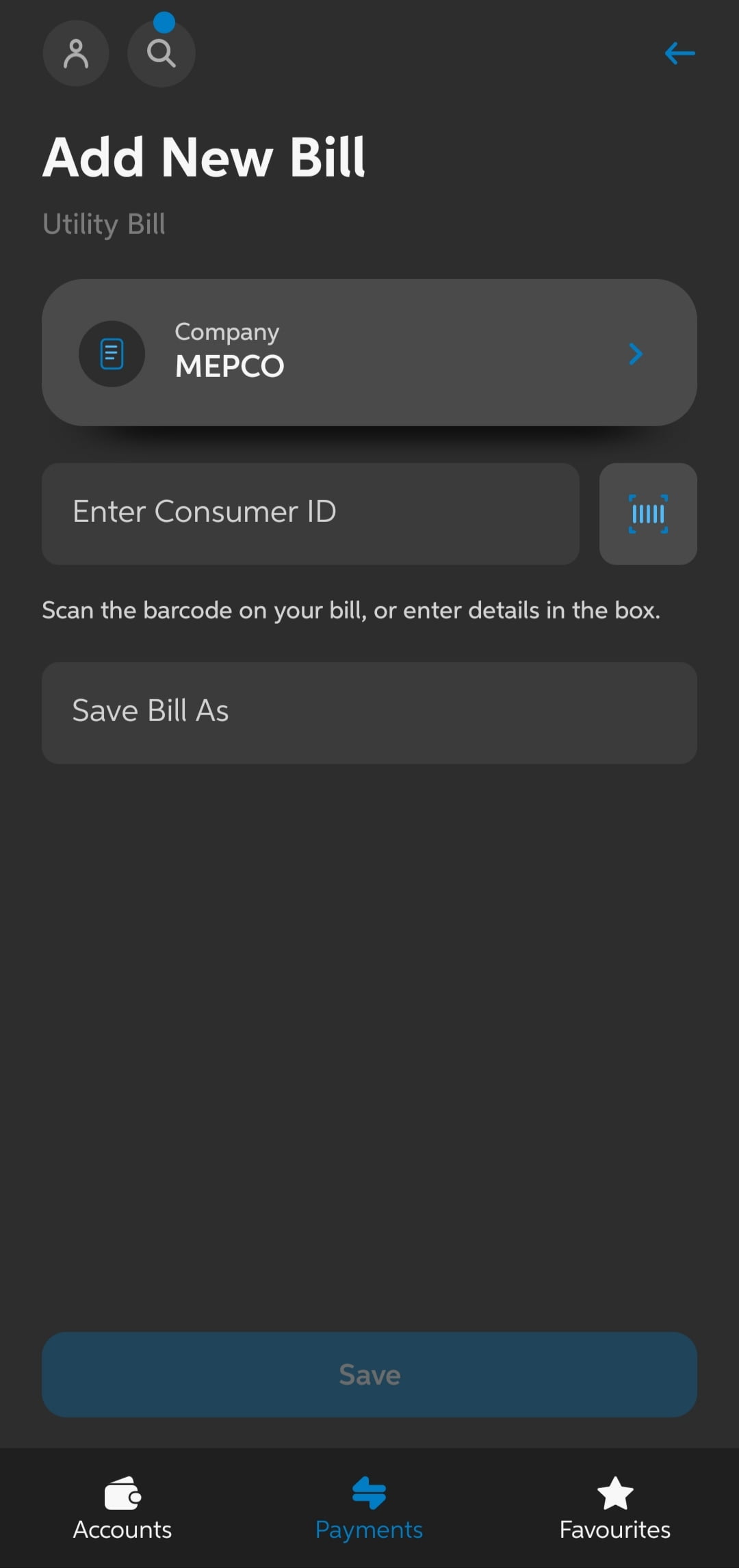
Note: This is a one time process. Next time you just have to select MEPCO and will be able to pay your bill without entering any consumer id.
Paying your MEPCO bill through your mobile phone is a convenient option for customers on-the-go. Most major banks in Pakistan have developed mobile apps that allow you to pay your electricity bill right from your phone.
The bank will deduct the amount from your bank account balance and credit it towards your MEPCO bill. This is usually reflected instantly. Paying your MEPCO bill through mobile apps is free for most banks. Some may charge a nominal fee.
Above I have mentioned some of the ways to pay MEPCO bills but you can also pay bills with other banking apps like Meezan Bank App, HBL Bank App, Zindagi App, Allied Bank App and all other banks that have their online banking apps.
How to Pay MEPCO Bill via Easypaisa
Step 1: Open the Easypaisa app and log in to your account.
Step 2: Tap on Bills from the home screen.
Step 3: Select Electricity from the bill categories.
Step 4: Search for MEPCO and select it from the list.
Step 5: Enter your 14-digit reference number. Your bill details will load automatically showing amount and due date.
Step 6: Review the bill amount and tap Pay Now. Confirm with your PIN or fingerprint.
Your payment is reflected immediately and a receipt is sent to your registered mobile number.
How to Pay MEPCO Bill via HBL Mobile Banking
Step 1: Download the HBL Mobile app and log in with your HBL account credentials.
Step 2: Go to Pay Bills from the main menu.
Step 3: Select Add New Biller and choose Electricity as the category.
Step 4: Search for MEPCO and enter your 14-digit reference number. Save the biller.
Step 5: Select MEPCO from your saved biller list, confirm the amount, and tap Pay.
Step 6: A confirmation SMS and in-app receipt will be sent immediately after successful payment.
HBL also supports scheduled payments — you can set a date for automatic monthly MEPCO bill payment.
How to Pay MEPCO Bill via Meezan Bank App
Step 1: Open the Meezan Bank app and log in.
Step 2: Go to Pay Bills and tap Add Biller.
Step 3: Select Utility Bills then Electricity.
Step 4: Choose MEPCO from the list and enter your 14-digit reference number. Save the biller.
Step 5: Select your saved MEPCO biller, enter the bill amount, and confirm with your transaction PIN.
Step 6: Payment is processed instantly and a receipt is available in your transaction history.
Meezan Bank charges no fee for bill payments.
How to Pay MEPCO Bill via ATM
You can pay your MEPCO bill at any ATM in Pakistan — no smartphone or internet connection needed.
Step 1: Go to any nearby ATM — HBL, UBL, Meezan, Allied Bank, MCB, or any 1-Link enabled ATM.
Step 2: Insert your ATM card and enter your PIN.
Step 3: From the main menu, select Bill Payment or Utility Bills.
Step 4: Choose Electricity from the utility types.
Step 5: Select MEPCO as your electricity company.
Step 6: Enter your 14-digit MEPCO reference number carefully.
Step 7: The ATM will display your current bill amount. Confirm and proceed.
Step 8: Collect the printed receipt from the ATM and keep it as proof of payment.
ATM bill payment is available 24 hours a day, 7 days a week. Best option for people who do not use smartphones but have an ATM card.
How to Pay MEPCO Bill at Pakistan Post Office
Pakistan Post Offices across the country accept MEPCO bill payments. This option is ideal for residents in smaller towns and rural areas where bank branches are not easily accessible.
Step 1: Take your physical MEPCO bill to the nearest Pakistan Post Office.
Step 2: Go to the payment counter and present your bill.
Step 3: Pay the bill amount in cash.
Step 4: The post office staff will stamp your bill as paid and give you a receipt. Keep it safely.
How to Verify Your MEPCO Bill Payment
After paying, always verify that your payment was recorded successfully. Here is how:
Via SMS:
You will receive an SMS confirmation from your payment app immediately after a successful transaction. Keep this SMS.
Via Banking App:
Check your transaction history in the app. A successful MEPCO bill payment will show a green confirmed status with
a receipt number.
Via Your Next Bill:
When your next month’s bill arrives, check the Arrears section on the right side. If it shows zero, your previous MEPCO bill payment was successful. If an amount appears, the payment was not recorded.
Via This Website:
Check your bill here using your reference number. If the previous month balance shows cleared, payment was recorded.
If payment shows as unpaid after 48 hours, call MEPCO helpline 0800-63726 with your receipt and reference number.
Late Payments:
Paying your MEPCO bill after the due date can result in late payment charges. The late payment penalty is usually a percentage of your total outstanding bill. For example, if your bill is Rs.1000 and you pay after the due date, you may be charged a 10% late fee of Rs.100.
The late payment charges keep accumulating every month until you clear your dues. If you have been late for 3 months in a row, the cumulative late fees can add up quickly. Besides the financial charges, not paying your electricity bill on time can lead to service disconnection.
MEPCO generally sends reminders and disconnect warnings before they actually disconnect the power supply. However, if the outstanding dues still remain unpaid for a prolonged period, the company can permanently disconnect service to the location. Getting reconnected after disconnection involves paying the overdue amount plus reconnection fees.
If you are facing financial hardship, contact MEPCO early to discuss alternate payment plans.
MEPCO Bill Due Date Extension
If you cannot pay before the due date, MEPCO allows you to request a short extension.
3-day extension: Available if your bill is less than Rs. 100,000. Contact your Assistant Manager Officer (AM-O)
at your local MEPCO subdivision office. 5-day extension: Available if your bill is more than Rs. 100,000. Requires approval from a higher officer.
How to request: Visit your nearest MEPCO subdivision office with your bill and explain the reason for the delay. Extensions are granted at MEPCO’s discretion. For larger bills that are difficult to pay at once, you can also request an installment plan — splitting your bill into 3 to 12 monthly payments. Visit the MEPCO homepage for full installment details.
Benefits of MEPCO Online Bill Payment:
The main benefits of paying online include:
- Convenience of paying from home
- No need to visit an office or payment center
- Secure electronic transfer directly to MEPCO
- Payment receipt via SMS
The main benefit of paying your electricity bill through mobile is the convenience. You can pay your bill anytime, anywhere through the phone in your pocket. It also saves you a trip to the MEPCO office or payment center. As long as you have the funds available in your bank account, paying your electricity bill is just a few taps away.
Overall, MEPCO Online Bill Payment offers a quick and easy way to pay your electricity bill online. Just be sure to have your account details handy to complete the payment accurately.