
LESCO Bill Online Check June 2026 | Download & Print Free
To check your LESCO bill online, enter your 14-digit reference number or 7-digit customer ID in the tool above and click Check Bill. Your complete LESCO electricity bill — showing bill amount, due date, units consumed, meter readings, and
12-month payment history — will appear instantly. The service is completely free, available 24/7, and requires no
registration or login. You can also download your bill as a PDF or print it directly from the screen.
لیسکو بل آن لائن چیک کرنے کے لیے 14 ہندسوں کا حوالہ نمبر درج کریں
How to Check LESCO Bill Online — Step by Step
Checking your LESCO bill online takes less than 30 seconds. Here is exactly what to do:
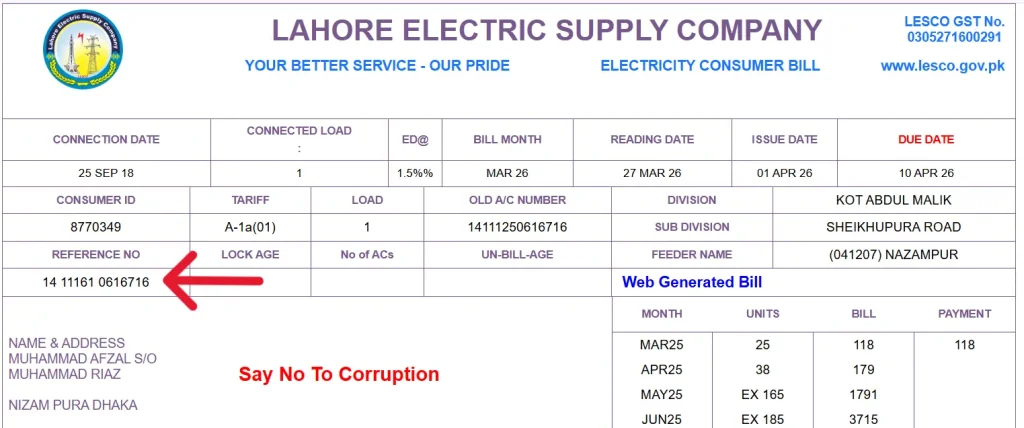
Step 1: Find your 14-digit reference number on your physical LESCO bill. It is printed at the top-left corner of the bill and ends with the letter U (urban) or R (rural).
Step 2: Enter the reference number carefully in the input field at the top of this page.
Step 3: Click the Check Bill button. Your complete LESCOonline bill will appear on the screen.
Step 4: To download your LESCO bill as a PDF, click the Print button shown on the displayed bill. In the print dialog box, change the Destination to Save as PDF and click Save. Your duplicate LESCO bill is now downloaded for free. If you entered a wrong number, an error message will appear. Double check your reference number and try again.
LESCO Bill Check by Customer ID
Do not have your reference number? You can check your LESCO bill online using your 7-digit customer ID instead. Your customer ID is printed at the top-left corner of your electricity bill, just above the reference number. It is 7 digits long and is another unique identifier for your electricity connection.
Enter your customer ID in the second input field on this page and click Check Bill. Your complete LESCO electricity bill will appear instantly — same as using the reference number method. The lesco online bill check by customer ID shows the same information: bill amount, due date, payment status, and the last 12 months of billing history.
This is the most helpful option for people who have lost their current bill but remember their customer ID from a previous bill.
LESCO Duplicate Bill — Download Your Free Copy
Lost your LESCO electricity bill? Do not worry at all. You can download a free LESCO duplicate bill from this page right now — no office visit required, no fees, no paperwork.
A duplicate bill is exactly the same as your original LESCO bill. It contains all the same information:
— Bill amount and due date
— Reference number and customer ID
— Meter readings (previous and current)
— Units consumed
— Breakdown of all taxes and charges
— 12-month billing and payment history
You can use a duplicate LESCO bill to make your payment at any bank, ATM, or online app — it is just as valid as the original printed bill. How to get your LESCO duplicate bill right now: Enter your reference number above, click Check Bill, then click the Print button and save as PDF. Done.
Can I Check LESCO Bill by CNIC?
This is one of the most commonly asked questions, so let us be clear about it: You cannot check your LESCO bill directly using your CNIC number. The reason is simple. LESCO allows multiple electricity connections under a single CNIC. If you searched by CNIC, the system would not know which specific connection to show you.
To check your lesco online bill, you need one of these:
— Your 14-digit reference number (printed on your bill)
— Your 7-digit customer ID (printed above the reference number)
However, your CNIC is still useful for one thing. If you have completely lost your bill and do not know your reference number, you can visit any LESCO subdivision office with your CNIC. The staff will look up your account and give you your reference number on the spot.
How to Find Your LESCO Reference Number and Customer ID
Both numbers are printed at the top-left corner of your physical electricity bill. Here is how to identify them:
Reference Number:
t is 14 digits long, followed by one letter — either U for urban or R for rural. Example: 01101234567890U. It is the main number used to check your lesco bill online.
Customer ID:
It is 7 digits long and printed just above the reference number. Example: 1234567. You can use this if your reference number is not available.
If you have lost your bill completely:
Option 1: Visit your nearest LESCO subdivision office with your CNIC. They will provide your reference number.
Option 2: Check an old bill. Your reference number stays the same every month — it does not change.
Option 3: Ask your neighbor for their bill. Your reference number is similar to theirs since they are in the same area — but you must enter your own number.
Note: LESCO has updated its billing system and some customers have received new reference numbers. Always use the reference number printed on your latest bill.
Understanding Your LESCO Electricity Bill
Your LESCO bill has several sections. Understanding each one helps you verify your bill and spot any errors quickly.
Customer Details Section (top-left):
This shows your name, address, connection type (domestic, commercial, industrial, agricultural), connection date, reference number, customer ID, and sanctioned load. Always verify this information is correct.
Metering Data Section:
This shows the billing month, meter reading date, previous reading, current reading, and total units consumed this month. The units consumed determine which tariff slab applies to your bill.
Charges Breakdown Section:
This shows a detailed list of every charge on your bill — electricity cost, meter rent, government taxes, fuel price adjustment, and all surcharges. We explain each charge in detail in the Taxes section below.
Billing History Table:
This is one of the most useful sections. It shows your last 12 months of electricity data — units consumed each month, bill amount, and payment status. Use this to track your consumption trends and verify your payments.
Taxes and Charges on Your LESCO Bill — Explained Simply
Many people are confused about the extra charges on their LESCO bill beyond the basic electricity cost. Here is a plain-language explanation of every charge:
Electricity Duty:
A government tax charged at 1.5% of your total bill. This goes to the provincial government.
GST (General Sales Tax):
The federal government applies 17% GST on your total electricity bill. This is the largest tax component for most consumers.
FPA (Fuel Price Adjustment):
This is a variable charge set by NEPRA every two months. It reflects changes in the cost of fuel used to generate electricity. When fuel prices rise, FPA increases your bill. When they fall, it reduces your bill.
FC Surcharge (Financing Cost Surcharge):
A fixed charge of Rs. 0.43 per unit. This is used to repay loans taken by the power sector for infrastructure.
QTA (Quarterly Tariff Adjustment):
NEPRA reviews tariffs every three months and applies adjustments to account for changes in fuel costs, exchange rates, and capacity payments.
Income Tax:
Applied on bills above a certain threshold. Affects commercial consumers and high-consumption residential users.
Meter Rent:
A small fixed monthly charge for the electricity meter installed at your premises.
The good news: you can see all of these charges itemized on your LESCO bill. If any charge seems wrong, you can dispute it — details in the Complaint section below.
LESCO Peak Hours 2026 — Save Money by Shifting Usage
LESCO follows seasonal peak hours. During peak hours, electricity costs more per unit for TOU meter users. Shifting heavy appliance use outside these hours can meaningfully reduce your monthly bill.
Season Peak Hours Off-Peak Hours
Dec to Feb 5:00 PM – 9:00 PM Remaining 20 hours
March to May 6:00 PM – 10:00 PM Remaining hours
June to Aug 7:00 PM – 11:00 PM Remaining hours
Sep to Nov 6:00 PM – 10:00 PM Remaining hours
Practical tips to save electricity during peak hours:
Run your washing machine in the morning, not the evening. Avoid using the iron, dishwasher, or oven during peak time. Set your AC to 26°C — this alone can reduce your bill. Use LED bulbs throughout your home — they use 80% less energy. Unplug chargers, TVs, and other devices when not in use. Stay within the protected consumer category (under 200 units) to benefit from lower subsidized rates.
How to Pay Your LESCO Bill Online — All Methods
LESCO offers multiple payment options. Here is a complete guide to every available method:
Via JazzCash:
Open JazzCash app → Utilities Bill → Electricity → Search LESCO → Enter reference number → Pay instantly.
Via Easypaisa:
Open Easypaisa → Bills → Electricity → LESCO → Enter reference number → Confirm and pay.
Via NayaPay or SadaPay:
Open app → Bills and Utilities → LESCO → Enter reference number → Pay from wallet balance.
Via QR Code (Fastest Method):
Your LESCO bill has a QR code printed on it. Open any banking or wallet app, select QR Payment, scan the QR code on your bill, and pay instantly. No need to enter any reference number manually.
Via Raast Digital Payment:
Open your bank's mobile app → Raast Payments → Bill Payments → Enter reference number or scan QR → Pay instantly with zero charges.
Via ATM:
Visit any ATM → Bill Payment → Electricity → LESCO → Enter 14-digit reference number → Confirm amount → Pay. Available 24/7. You receive a printed receipt.
Via Bank Branch:
Take your physical or printed duplicate LESCO bill to any commercial bank branch. Pay at the cash counter and receive a stamped receipt. All scheduled banks are authorized to accept LESCO bill payments.
Via Power Smart App:
Download the official Power Smart app from Play Store. Register with your reference number. You can view your current bill and pay directly from the app.
Via Local Shop:
Visit any EasyLoad or bill payment shop in your area. Give them your bill or reference number. They charge a small fee of Rs. 10. You receive an SMS confirmation.
LESCO Load Shedding Schedule — Check by Reference Number
Knowing your area's load shedding schedule helps you plan your day and protect your appliances from sudden power cuts.
How to check your LESCO load shedding schedule:
Step 1: Visit the official CCMS portal at ccms.pitc.com.pk
Step 2: Enter your 14-digit LESCO reference number in the input field and click Search.
Step 3: Your feeder details will appear — including your feeder name, grid station, and the exact load shedding schedule for your area.
The schedule shows how many hours of load shedding are planned per day and at what times. LESCO updates this schedule regularly, so check it at the start of each week for the most accurate timing. If your area is experiencing unscheduled load shedding beyond the official schedule, you can report it by calling the LESCO helpline at 118.
LESCO Complaint — How to Report and Resolve Issues
This section is missing from all competitor pages — so we cover it completely here.
Common LESCO complaints consumers face:
— High or incorrect electricity bill
— Faulty or fast-running meter
— Power outage not restored in time
— Voltage fluctuation or low voltage
— Wrong meter reading on bill
— Overbilling compared to actual units consumed
— Delay in new connection or meter replacement
How to register a LESCO complaint:
Method 1 — Phone:
Call 118 for power failures and emergencies. Available 24/7. Call 0800-96970 for billing complaints and general issues.
Method 2 — Online Portal:
Visit ccms.pitc.com.pk → Register Complaint → Fill in your reference number, complaint type, and details. You will receive a tracking number via SMS.
Method 3 — Pakistan Citizen Portal:
Download the Pakistan Citizen Portal app → Lodge complaint → Select LESCO as the department. This escalates your complaint to a government level.
Method 4 — NEPRA Consumer Portal:
Visit nepra.org.pk for unresolved billing disputes. NEPRA is the electricity regulator and can intervene in cases where LESCO has not resolved your issue.
How to track your LESCO complaint:
Go to ccms.pitc.com.pk → Track by Reference → Enter your reference number to see complaint status.
LESCO complaint resolution timeframe:
Simple billing issues: 24 to 48 hours
Meter replacement: 3 to 7 working days
Power restoration after fault: Within 2 to 4 hours
New connection: 30 to 73 days depending on load category
LESCO Bill for Overseas Pakistanis
No competitor covers this — and there are millions of overseas Pakistanis checking LESCO bills for family back home. This section is written specifically for them. If you are in Saudi Arabia, UAE, the UK, the USA, or anywhere else, you can check the LESCO bill for your family in Lahore, Kasur, Okara, Sheikhupura, or Nankana Sahib from anywhere in the world.
All you need is the 14-digit reference number or 7-digit customer ID from any old bill — ask your family to send it to you on WhatsApp or email.
Once you have it, enter it above and you can:
— See the current bill amount
— Check the due date so you can send money in time
— Download the duplicate bill as PDF
— Pay it online through any international banking app that supports Pakistan bill payments
Many overseas Pakistanis use JazzCash, HBL, UBL, or Meezan Bank international apps to pay LESCO bills directly from abroad. Your family does not need to go anywhere — you can handle it all remotely.
LESCO SMS Registration — Get Bill Alerts on Your Phone
LESCO offers a free SMS service that sends you alerts about your meter reading and bill the moment they are available — before you even receive the physical copy.
Once registered, you will receive SMS alerts for:
— Meter reading date and units consumed
— Bill amount and due date when bill is generated
— Load shedding schedule for your area
— Payment confirmation after paying your bill
How to register for LESCO SMS service:
Option 1 — Online:
Visit the official LESCO website → Customer Services → SMS Registration → Enter your Customer ID and mobile number → Submit. You will receive a confirmation SMS.
Option 2 — Via Meter Reader:
When the LESCO meter reader visits your home each month, simply ask them to register your mobile number in the system. They can do it on the spot using their device.
Option 3 — Visit LESCO Office:
Visit your nearest LESCO subdivision office with your bill and CNIC. Request SMS registration at the counter.
This service is completely free. Once registered, you will always know your bill before the paper copy arrives.
How to Apply for a New LESCO Connection
LESCO allows you to apply for a new electricity connection completely online — no need to visit any office for the
initial application.
Step 1: Visit the ENC portal at enc.com.pk
Step 2: Click Apply from the left menu.
Step 3: Select LESCO from the company dropdown. Choose your subdivision, connection category (domestic, commercial, industrial), and enter your neighbor's reference number for location verification.
Step 4: Fill in your personal details — name, CNIC, mobile number, and address.
Step 5: Enter your premises details — minimum required load and address for meter installation.
Step 6: Upload required documents (max 300KB each):
— Property document (Fard, Registry, or File)
— Attested copy of your CNIC
— Attested CNIC copy of a witness
— Copy of neighbor's electricity bill
— Wiring contractor's test report
Step 7: Submit. You will receive a tracking ID. Save this — you will need it to track progress and download your Demand Notice.
Time required for new connection:
Category 1 (up to 15kW load): 30 days
Category 2 (16kW to 70kW): 53 days
Category 3 (71kW to 500kW): 73 days
After verification, your Demand Notice (DN) will be issued. Pay it at any designated bank, upload the receipt to the ENC portal, and your meter will be installed within the timeframe above.
Benefits of Checking Your LESCO Bill Online
Still checking your bill the old way — waiting for the paper copy or standing in queues? Here is why switching to online makes sense:
Available 24/7: Check your bill at 2AM if you want. No office hours, no queues, no waiting.
Instant access: Your bill appears in 3 seconds after entering your reference number.
Never lose your bill: Download as many PDF copies as you need, any time. No more lost or torn paper bills.
Check before paying: See the amount before going to the bank, so you always have the right funds ready.
12-month history: Track your electricity usage trends over an entire year — all on one screen.
Spot errors early: If your bill looks wrong, you notice it immediately and can complain before the due date — instead of disputing it after paying.
Save paper: Going digital means fewer paper bills printed and delivered — better for the environment.